How to Add FAQ to Products
FAQs (Frequently Asked Questions) on Products are common questions and answers that help customers learn more about a product before making a purchase.
Adding FAQs can reduce customer inquiries, build trust, and increase sales by providing important information upfront.
Examples of Product FAQs
Q: What material is this product made from?
A: This product is made from 100% premium cotton.
Q: What sizes are available?
A: Available sizes include S, M, L, XL, and XXL.
Q: Is this item returnable?
A: Yes, returns are accepted within 7 days of delivery.
Q: How long does delivery take?
A: Delivery within Kampala takes 1–2 business days.
Q: Does the product come with a warranty?
A: Yes, it includes a 12-month manufacturer warranty.
Why Add FAQs?
✅ Answer common customer questions in advance
✅ Improve customer confidence and trust
✅ Reduce support requests
✅ Help customers make faster purchasing decisions
✅ Increase conversion rates
Tip: Add FAQs that are specific to your product, such as sizing, materials, usage instructions, compatibility, warranty, shipping, and return policies. The more helpful the information, the better the shopping experience for your customers.
Step by Step to Add FAQ to your Product
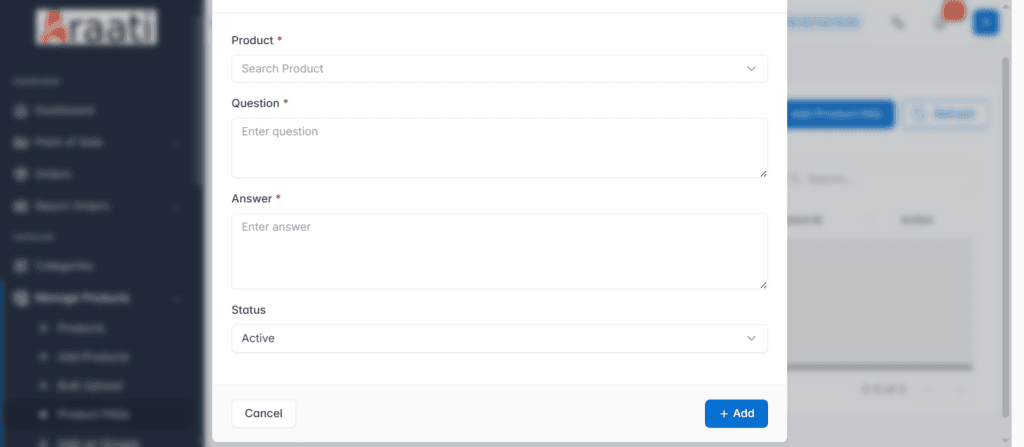
- Click on Product FAQs under Manage Product
- Search for a product you want to add FAQ to in product
- Add A question
- Answer the question you added above
- Change status to active or inactive and click add
- Repeat these steps to add more FAQs to the same product or other products